The math behind cross-entropy: CrossEntropyLoss() in PyTorch
For binary classification we use Binary Cross Entropy Loss, defined as follows:

Because the value after ln is negative, we add a minus sign so that we minimise the loss (otherwise we would be optimising towards the maximum);
for example, when l=1 (the label is a positive sample), Loss = -logp, so we want p to be as large as possible to make the loss as small as possible; ideally p reaches 1, which means the classification is correct
Multi-class classification
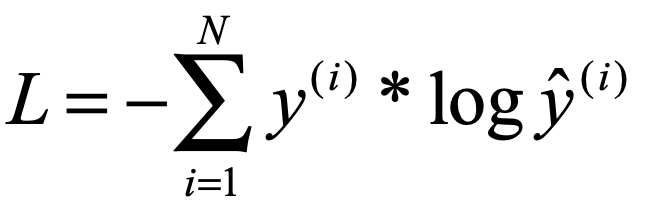
Here the label is expanded into a one-hot encoding
We mainly discuss pixel-level classification of images
# -*- coding: utf-8 -*-
'''
@File  : multiclass.py
@Author: Moule Lin
@Date  : 2020/11/1 17:53
@Github: https://github.com/moulelin
'''

'''
How CrossEntropy works
In PyTorch, CrossEntropyLoss() essentially combines softmax, log and NLLLoss into a single step.

1. After Softmax all values lie between 0 and 1, so after ln the range is from negative infinity to 0.

2. Then take the log of the Softmax output; this turns multiplication into addition to reduce computation while preserving the function's monotonicity.

3. NLLLoss takes the value from the above output that corresponds to the Label (in the example below:
it takes the values in log_output\logsoftmax_output that correspond to y_target), drops the minus sign, and then averages them.

    Tip: CrossEntropyLoss() converts the Label into one-hot form

'''
import torch
import torch.nn as nn


loss = nn.CrossEntropyLoss()# use default parameters
input_data = torch.randn(1,3,2,2,requires_grad=True) # the first dimension corresponds to channel; CrossEntropy operates over the channel dimension
target = torch.tensor([[0, 1],[2, 0]],dtype=torch.long).unsqueeze(0) # corresponds to a 2*2 matrix; every point has a class


print(input_data)

print(target.shape)
print(input_data.shape)
loss_item = loss(input_data,target)
print(loss_item)
# Above uses Cross Entropy directly; below implements it step by step


softmax_func=nn.Softmax(dim=1) # squash the channel dimension into 0-1
softmax_out = softmax_func(input_data)

print("After softmax:")
print(softmax_out)
print("After log:")
log_output=torch.log(softmax_out) # take the logarithm
print(log_output)

print("After NLLLoss:")
nllloss_func=nn.NLLLoss()
nlloss_output=nllloss_func(log_output,target)
print(nlloss_output)

# import math
# loss = nn.CrossEntropyLoss()
# data = torch.randn(1,3,1,5,requires_grad=True)
# label = torch.empty((1,1,5),dtype=torch.long).random_(5)
# out = loss(data,label)
# print(data.shape)
# print(label.shape)
# print(out)
Output:
tensor([[[[-0.2493, -0.9333],
          [ 0.0676,  1.2035]],

         [[ 0.2987, -0.6044],
          [-0.1341,  0.0938]],

         [[-1.3529, -0.2693],
          [-0.3259, -0.7915]]]], requires_grad=True)
torch.Size([1, 2, 2])
torch.Size([1, 3, 2, 2])
tensor(0.9862, grad_fn=<NllLoss2DBackward>)
After softmax:
tensor([[[[0.3266, 0.2308],
          [0.4013, 0.6823]],

         [[0.5650, 0.3207],
          [0.3280, 0.2249]],

         [[0.1083, 0.4484],
          [0.2707, 0.0928]]]], grad_fn=<SoftmaxBackward>)
After log:
tensor([[[[-1.1189, -1.4660],
          [-0.9131, -0.3823]],

         [[-0.5709, -1.1371],
          [-1.1148, -1.4921]],

         [[-2.2225, -0.8020],
          [-1.3066, -2.3773]]]], grad_fn=<LogBackward>)
After NLLLoss:
tensor(0.9862, grad_fn=<NllLoss2DBackward>)
There are four pixels here, labelled [[0, 1],[2, 0]]. For the first pixel, the class is 0 and the output has 3 classes, so the label is expanded to [1,0,0],
meaning the value I want to pick out is the first element on channel 0, here -1.1189. Likewise, the second pixel expands to [0,1,0], giving -1.1371; the third to [0,0,1], giving -1.3066; and the fourth to [1,0,0], giving -0.3823. Take the absolute values of these four numbers, add them up and divide by 4: (1.1189+1.1371+1.3066+0.3823)/4 = 0.9862
So for an image whose input dimensions are B,C,W,H, the label just needs dimensions B,1,W,H